Xubuntu dependencies for powercli and ansible
Note, I prefer to use a light weight xubuntu system to manage vcenter and associated infrastructure with a combination of powershell, powercli and ansible. You could do all of this on Windows.
Ansible Dependencies
sudo apt install sshpass python3-paramiko git
sudo apt-add-repository ppa:ansible/ansible
sudo apt update
sudo apt install ansible
ansible --version
cat >> ~/.ansible.cfg << EOF
[defaults]
host_key_checking = false
EOF
PowerCLI Dependencies
- logout an in if you've just installed snapd, so that is added to path for current user.
Powershell Snap
sudo snap install powershell --classic
pwsh
Write-Host $PSVersionTable
PowerCLI Libraries
Install-Module VMware.PowerCLI -Scope CurrentUser
Get-Module VMware.PowerCLI -ListAvailable
Set-PowerCLIConfiguration -InvalidCertificateAction Ignore
Set-PowerCLIConfiguration -Scope User -ParticipateInCEIP $false
Other Useful Software
sudo apt install remmina onboard
onboard is useful to execute function commands in the vcenter console like F2
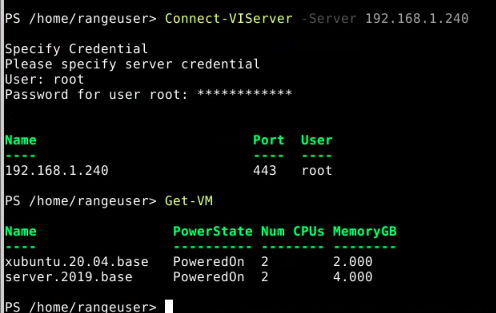
Testing Connectivity with an ESXi Host
Connect-VIServer -Server 192.168.1.240
Get-VM
exit
Visual Studio Code
sudo snap install code --classic
VSCode is a memory hog, 4GiB or better is recommended